Understand your architecturewhile AI builds it.
Agents now write code faster than anyone can follow. ArchDoc keeps a living map of your system next to the code: your agents read it before every edit and keep it true as they go, so you always see what your system is, what's changing, and why.
Reads the code you already have
- TypeScript
- Python
- Go
- Java
- Rust
- Next.js
- Spring
- Rails
- Laravel
- Django
- axum
- actix-web
Works with your agent
- Claude Code
- Cursor
- Codex
- Any MCP client
Why
Your agents build fast. Your understanding has to keep up.
You lose the picture
An agent can touch five services in an afternoon. A week later, nobody on the team can say how the system fits together anymore.
Generated summaries have no owner
A summary says what the code does today. Nobody agreed to it, so it can't say what the code is supposed to do.
Diagrams drift
A wiki page is right the day it's drawn. After it's wrong a few times, nobody trusts it, and nobody updates it.
ArchDoc's answer: a model people own and agents can read, kept in the repository, updated with every change, and always there to explore.
Explore
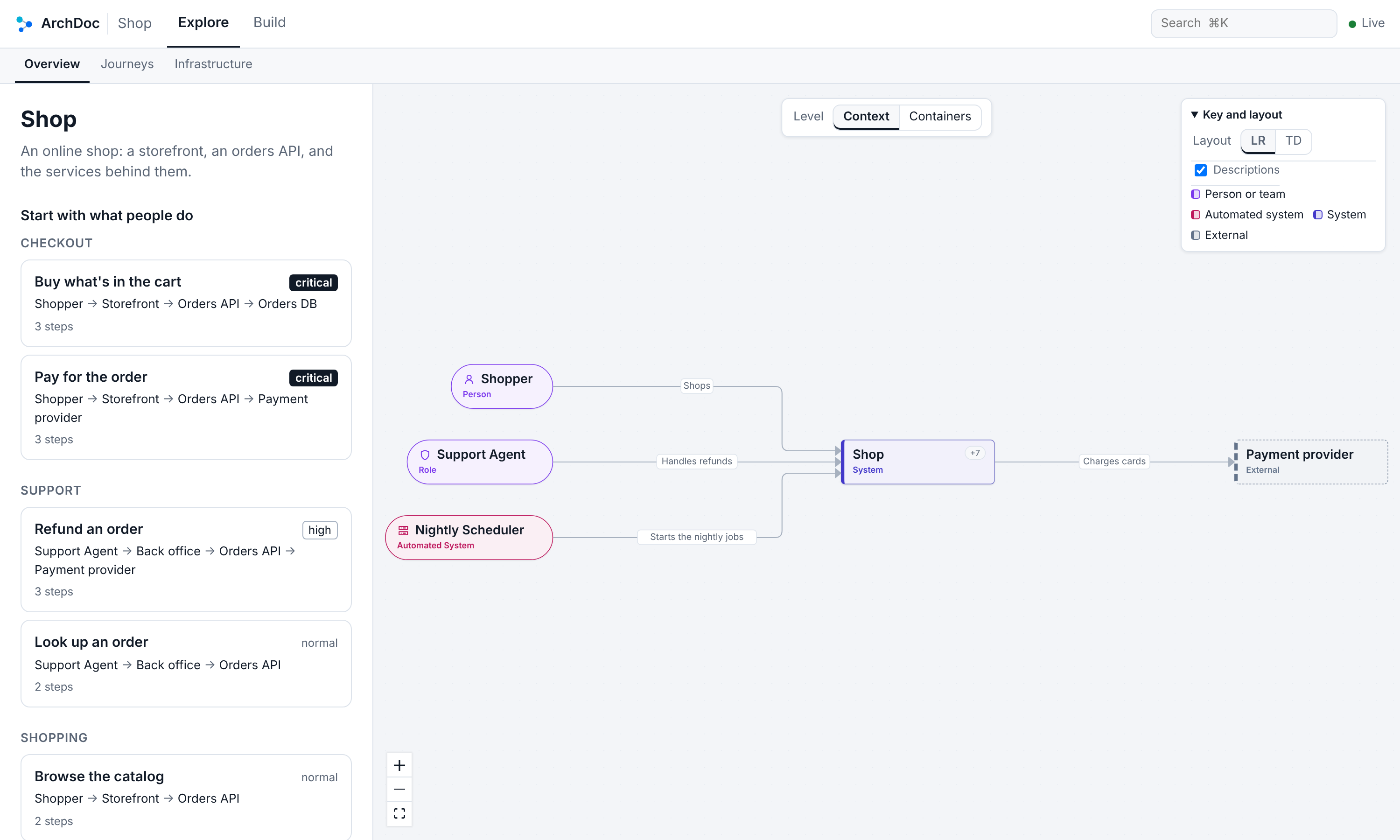
See your whole architecture, one C4 level at a time.
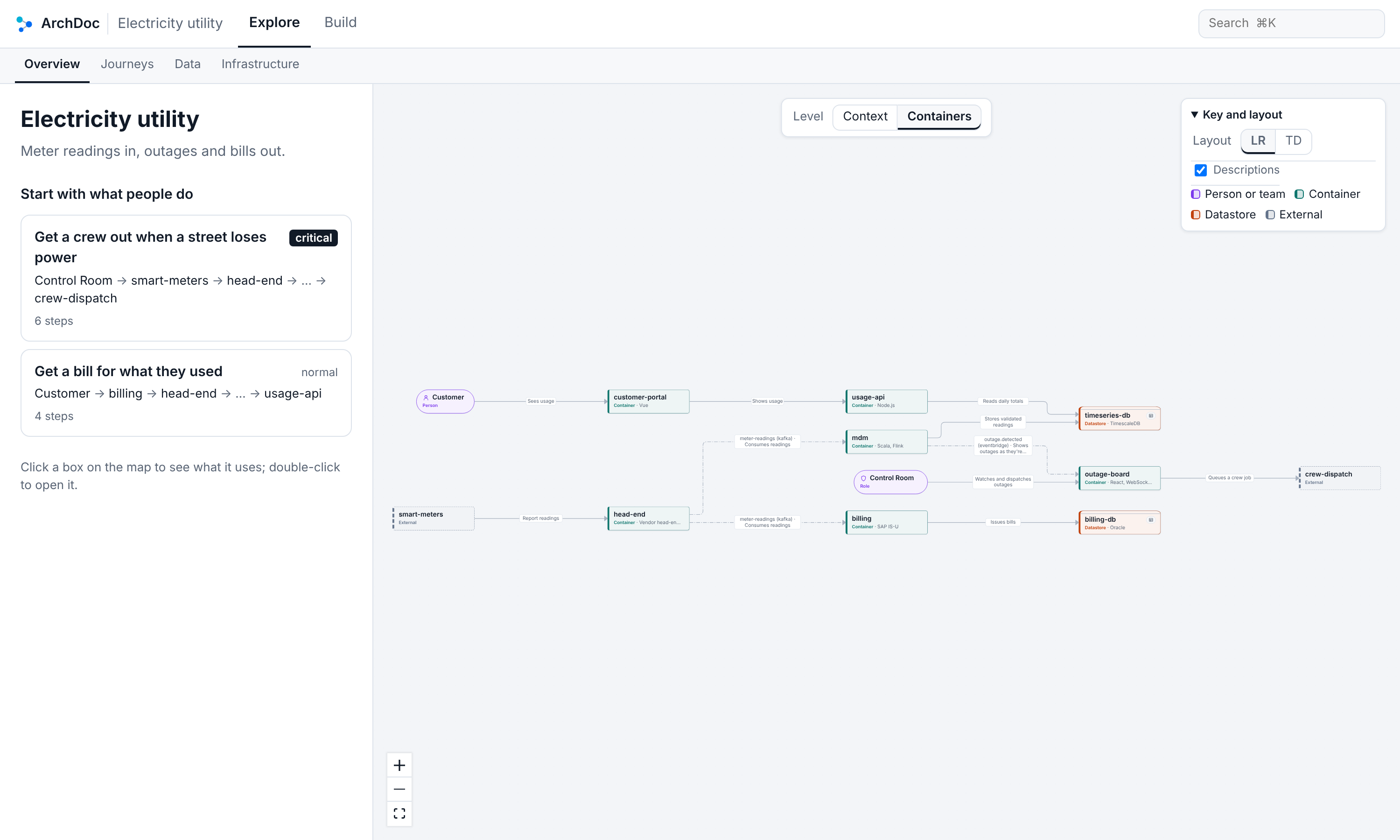
archdoc view opens your system in the browser. Start at the C4 context: the system, the people who use it, and what it talks to. Open it for its containers, open a container for its components, and click through any box to its code. Journeys, data, and infrastructure are one tab away.
Open it one level at a time
Start at the context, then open the system for its containers and datastores, and a container for its components. Every arrow says what it carries and how, and the journeys that matter sit beside the map, most important first.
- Context, containers, and components, the C4 way
- Shapes and colors say what each box is
- Click through from any box to its code
Triage
Your agent shows you why the bug happened.
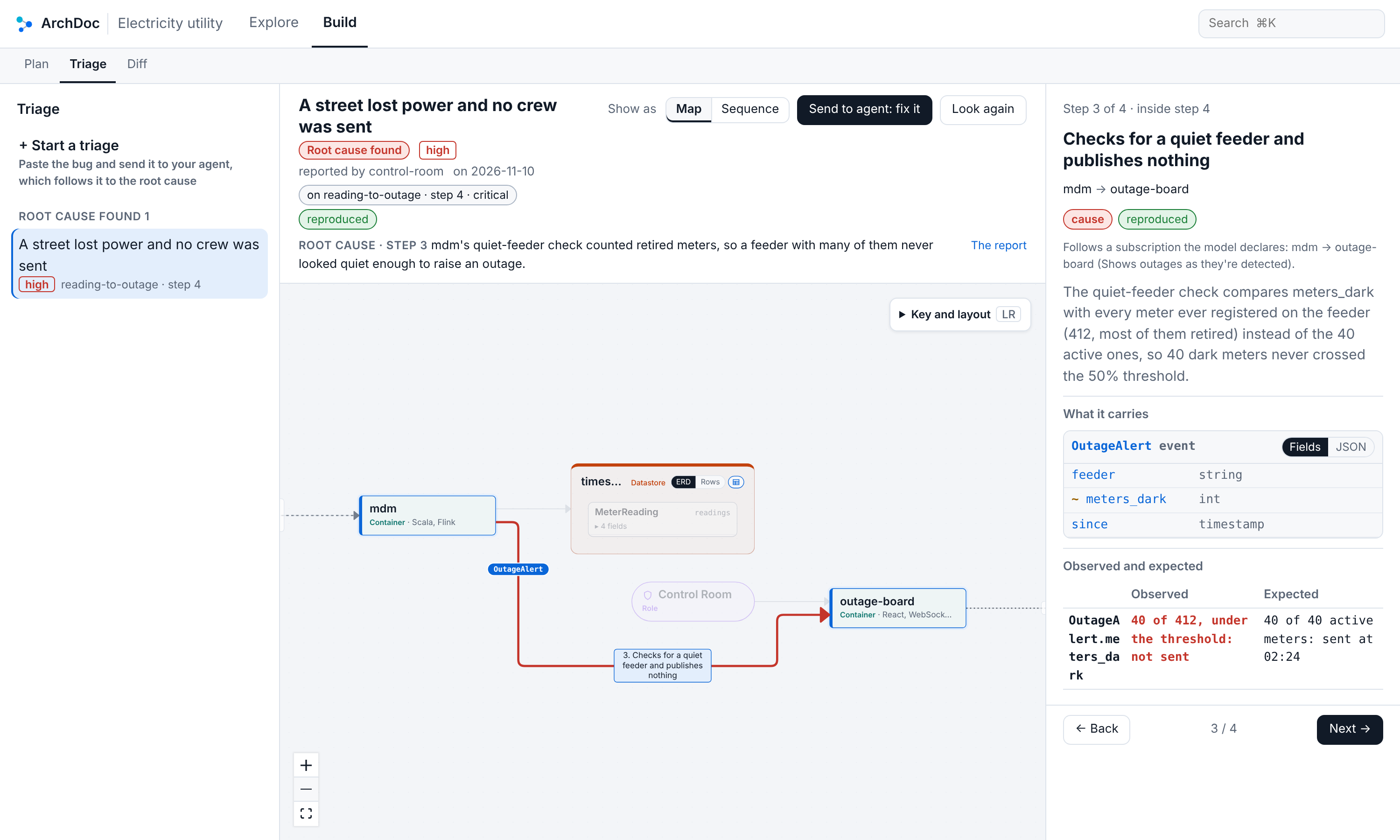
Paste an error, a stack trace, or what went wrong, and send it to your agent. It follows the bug through your system hop by hop, with evidence at every step, and draws the path on your architecture: the step where it went wrong, what it carried, what was observed, and what was expected.
- The bug's path drawn as a map or a sequence
- The root cause marked, with the code behind it
- Observed and expected, side by side
- A record kept in the repo, with the fix
Plan
Craft the implementation plan with your agent, on the map.
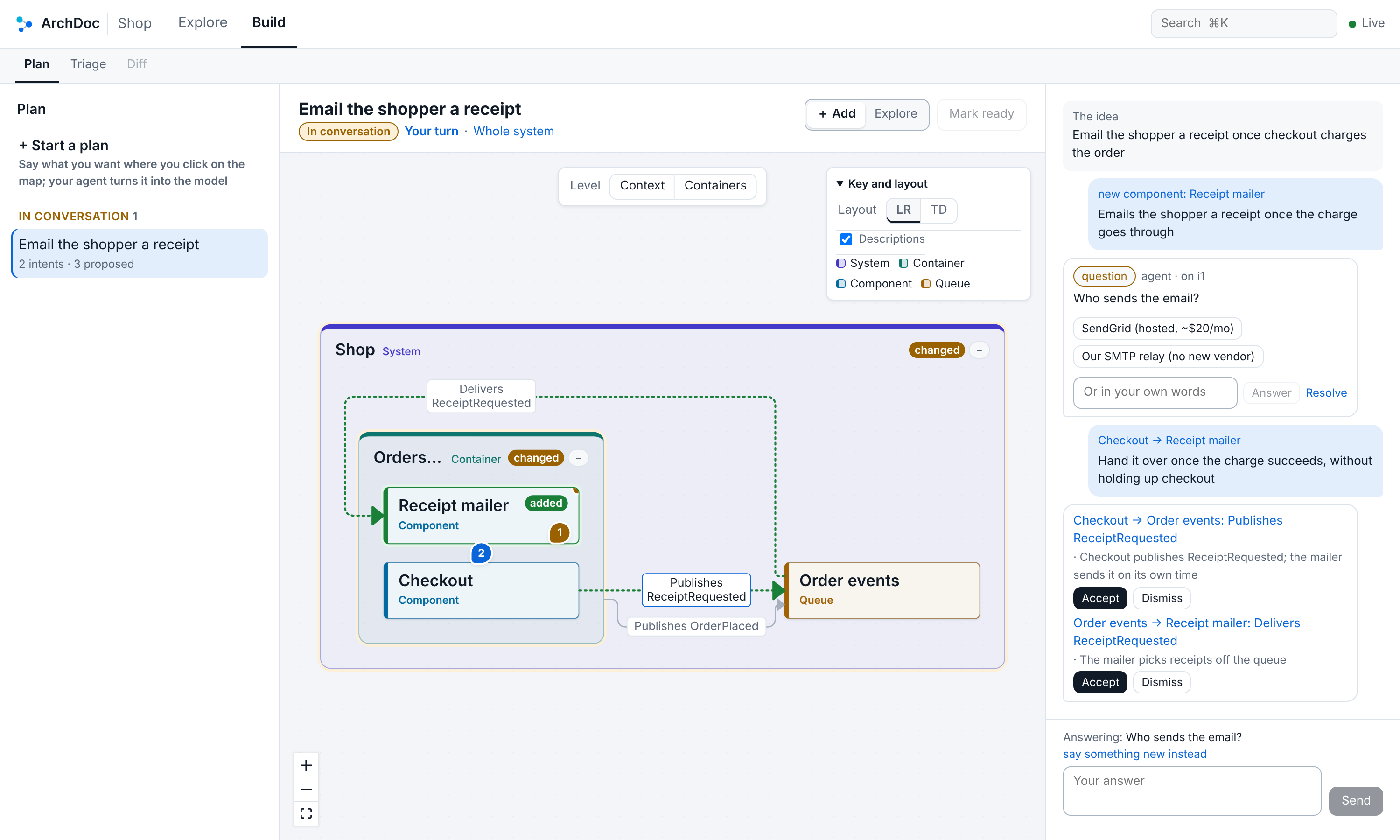
Skip the long markdown plan. Click where the change belongs and say what you want. Your agent checks it against the code and answers in turn: the boxes and arrows that carry it out, for you to accept or dismiss, and a question with one-tap options whenever a design choice is yours to make.
- You drive the design; the agent proposes nothing you didn't ask for
- A turn-by-turn conversation, one question at a time
- Mark it ready, and the agent builds it task by task
The everyday loop
Every task: context, edit, check, seal.
Install the plugin and your agent follows the same four steps on every change, through MCP or the CLI. It's the fastest way for it to find where code lives, and the reason the model stays true.
- 01
Context
archdoc_contextBefore it greps, your agent asks where the task belongs. It gets the files and functions to open first, the journeys and data rules in play, the tests to run, and who owns it.
- 02
Edit
archdoc_editIt changes the model with the code, by ID: add, set, rename, remove. All of a batch lands or none of it, and an edit that would add errors is refused.
- 03
Check
archdoc_checkBefore it hands the work back, it checks the change against the model: undeclared dependencies, broken rules and journeys, stale paths, and personal data going somewhere new.
- 04
Seal
archdoc_sealIt re-reads each fact whose code changed and seals it by name. Reviewers see exactly what the agent vouched for, so the model can't quietly drift.
What's in 1.0
Everything a change touches, answered the same way everywhere.
Ten MCP tools
context, show, find, edit, check, seal, init, paths, plan, and triage. Each one is also a CLI command of the same name.
Seals that catch drift
Each fact is fingerprinted against its code. When the code moves, ArchDoc says which facts to re-read, so the map never quietly goes stale.
Diff any two branches
Build's Diff tab reads both sides from git: what your agent's branch changed, with new and changed boxes marked on the map and removed ones as ghosts.
Init that reads your stack
Workspaces, manifests, and imports in TypeScript, Python, Go, Java, and Rust, and routes in the frameworks you use.
Rules for where data may go
Say where classified data may be stored and where it may never go, and every check holds your agents to it.
Across every repo
Reference another repo’s elements by namespace, pin them in a lockfile, and see the whole landscape at once.
The model
Plain YAML in .archdoc/, versioned with the code.
- Actors
- Who uses the system: people, roles, partner organizations, automated systems, and AI agents.
- Elements
- What it's made of, nested from systems to components, each mapped to the code that implements it.
- Journeys
- How actors reach their goals, step by step, checked against the relationships the model declares.
- Data
- What's sent and stored, with classified fields and lineage from one record to the next.
# .archdoc/archdoc.yaml
actors:
  passenger:
    kind: person
    uses:
      mobile-app: Requests rides, pays, rates drivers

elements:
  mobile-app:
    kind: container
    code: [{ path: apps/mobile/** }]
    uses:
      api-gateway: Calls all backend APIs

journeys:
  book-a-ride:
    actor: passenger
    goal: Get a ride to a destination
    importance: critical
    steps:
      - { from: passenger, to: mobile-app, action: Enters destination }
      - { from: mobile-app, to: api-gateway, action: POST /trips }
Built to be trusted
Your agent reasons. ArchDoc keeps the facts straight.
No LLM
in the engine
@archdoc/core is deterministic and makes no network calls. Same question, same answer, in your editor, your browser, and CI.
74%
leaner skill
The agent skill loads only the everyday workflow. Init, triage, and plan are read when a task needs them, from 8,571 words to 2,219.
Local
by default
The explorer answers only on your own machine, and your own agent does the reasoning. The model never leaves the repo.
Yours
plain YAML
The model lives in your repository next to the code, versioned and reviewed like it, and owned by the people who build the system.
Map your system in one session. Keep up with it from then on.
Install the plugin, open a repository, and ask your agent to start an architecture model. It runs archdoc init, shapes and describes what it finds, and checks the result until the model is done. From then on, every task starts from it.
# In Claude Code
/plugin marketplace add ArchDoc/archdoc
/plugin install archdoc@archdoc

# Anywhere, with Node.js 22.12 or later
npx -y @archdoc/cli init    # start a model in this repository
npx -y @archdoc/cli view    # open it in the explorer